

Give Claude Your Data Without Giving Away Your Data
It usually starts with a small export.
Someone in operations needs a quick answer — which category had the worst return rate last week, and in which cities? The database is right there, but the AI chat window is faster. So they download a CSV from the orders system, trim it to what looks relevant, and paste it in. The answer comes back in seconds. The file stays in a downloads folder, then in a chat history, then in a forwarded thread nobody remembers creating.
Nobody in that chain meant to leak anything. They just took the only route that worked: copy the data to the AI, because the AI had no governed route to the data.
There is a better route, and it runs in the opposite direction. Instead of moving a copy of the data out to the AI client, you give the AI client a narrow, authenticated door into the workspace where the data already lives — and every request has to pass through your permissions on the way in.
The export is the problem, not the question
The question itself is ordinary work. The export is where control is lost:
A copy has no permissions. The source database knew who could see which tables. The CSV does not. Once rows are in a file, anyone holding the file holds the rows.
A copy has no expiry. The live table will be corrected tomorrow. The pasted extract will still be quoted next month, wrong numbers and all.
A copy answers only once. Next week's version of the same question means another export, another paste, another file — and no shared query or dashboard the team can reuse.
Banning AI chats does not fix this. It just pushes the exports to personal accounts, where there is even less control. The fix is to make the governed route the easy route.
What MCP changes
The Model Context Protocol is an open-source standard for connecting AI applications to external systems — data sources, tools and workflows — in a standard way, rather than through a custom integration for every pair of tools. Its own documentation compares it to a USB-C port for AI applications: one standard socket instead of a different cable for every device.
TridaPad ships with a built-in MCP server, so that standard socket already exists on the workspace your team uses. Connect Claude Desktop, Claude Code, Cursor or any other MCP client to it, and the AI client can explore schemas, run queries and build dashboards through TridaPad — without your team writing integration code, and without anyone handing the client a database password.
How TridaPad puts a gate in the middle
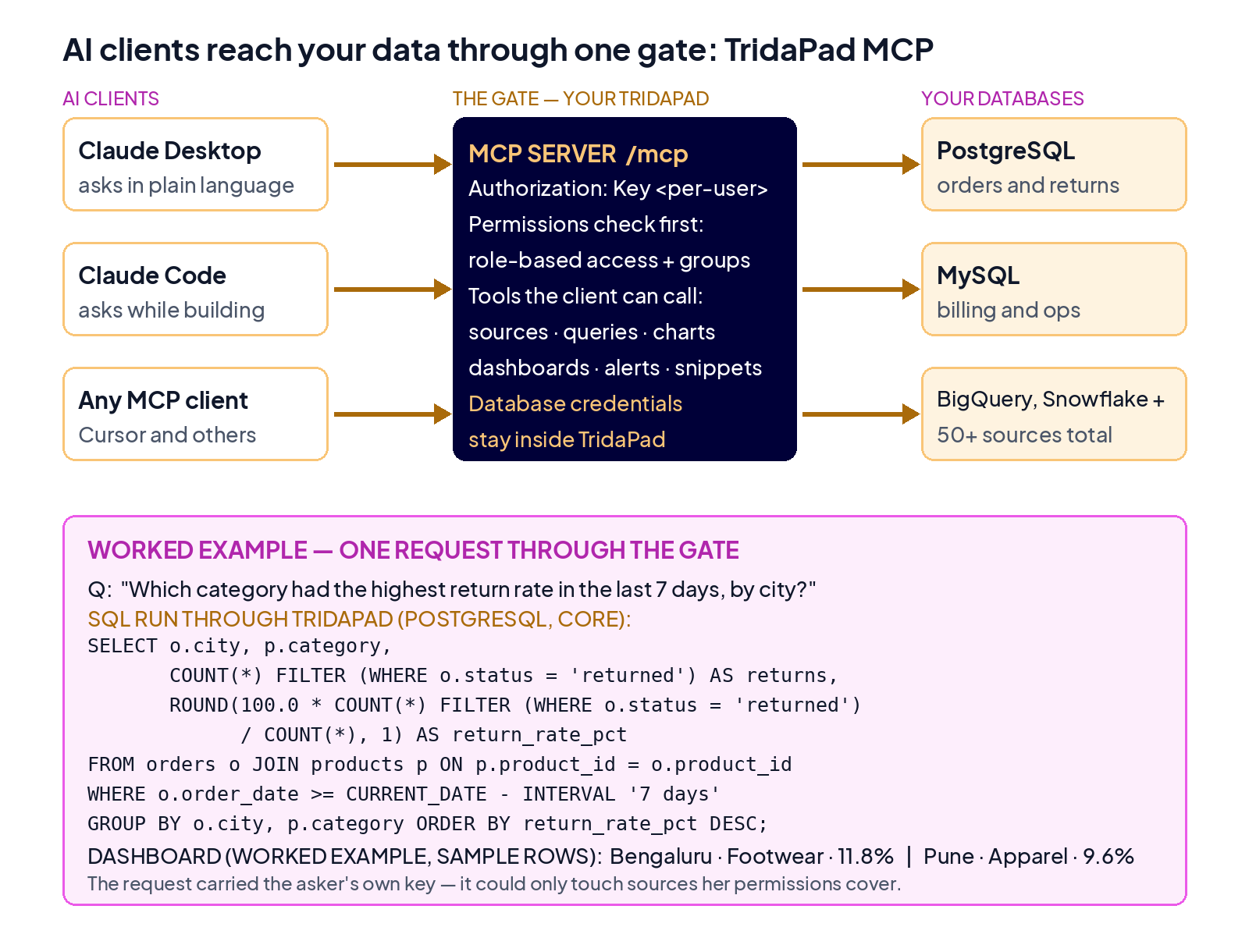
The important part is not that the AI client can reach the data. It is what sits between the client and the data:
Your TridaPad is the endpoint. The MCP server is hosted at your own TridaPad, at its
/mcpaddress. TridaPad itself runs cloud or self-hosted — on Render, AWS, Azure, GCP or on-premises — so the team chooses where the workspace lives.Every user brings their own key. The client connects with a per-user API key, sent as
Authorization: Key <key>. A request arrives as a named person, not as a shared service account — and a key can be revoked for that person without breaking everyone else.TridaPad's permissions still apply. Role-based access and the source and group permissions you already manage in TridaPad decide what that user — and therefore their AI client — can query. The AI client inherits a person's access; it does not get a bigger one.
The tools are workspace tools. Through the MCP server the client works with TridaPad's own objects — data sources, saved queries, visualisations, dashboards, alerts and snippets — so the SQL it runs and the charts it builds land inside the workspace, visible to the team, instead of inside a private chat.
Put plainly: the database credentials stay in TridaPad, the permissions stay in TridaPad, and the work product stays in TridaPad. The AI client brings the questions.
One request, start to finish
The connection is a short block in the AI client's configuration — this is the pattern from TridaPad's product page, with your own workspace address and key:
{
  "mcpServers": {
    "tridapad": {
      "command": "npx",
      "args": ["-y", "mcp-remote", "https://YOUR_TRIDAPAD_URL/mcp"],
      "headers": { "Authorization": "Key YOUR_API_KEY" }
    }
  }
}
Now the operations lead asks the return-rate question directly in Claude, in plain words:
"Which product category had the highest return rate in the last seven days, broken down by city? Build a dashboard for it."
Claude does not receive a copy of the orders table. It calls TridaPad's MCP tools: first to look at the schema of the sources this user is allowed to see, then to run a query through TridaPad. In PostgreSQL form, the core of that query reads:
SELECT o.city,
       p.category,
       COUNT(*) FILTER (WHERE o.status = 'returned') AS returns,
       COUNT(*) AS orders,
       ROUND(100.0 * COUNT(*) FILTER (WHERE o.status = 'returned')
             / COUNT(*), 1) AS return_rate_pct
FROM orders o
JOIN products p ON p.product_id = o.product_id
WHERE o.order_date >= CURRENT_DATE - INTERVAL '7 days'
GROUP BY o.city, p.category
ORDER BY return_rate_pct DESC;
The result comes back as a dashboard in TridaPad — city and category rows, return counts, and the return rate — that the whole team can open, refresh and reuse next week. The SQL sits under the chart where anyone can read it. And because the request carried the operations lead's own key, it could only ever touch the sources her permissions already cover. A colleague in finance, asking his own client a question about the same workspace, gets answers bounded by his permissions, not hers.
What this does not do
Four limits are worth stating plainly.
MCP does not set your permissions for you. If a group in TridaPad has access to a source it should not have, an AI client using that group's access inherits the mistake — so connect the first source narrowly and widen it deliberately. It does not make every AI-written query right; the SQL is visible in the workspace precisely so a person can check it before a number travels. It does not govern what people do in other tools — a team that keeps pasting exports elsewhere still has an export problem, which is why the governed route has to be the easy one. And the key is a credential: store it like one, one per person, and revoke it when a person leaves or changes roles.
Start with one source and one team
Pick one team that is pasting exports today, connect one of its sources to TridaPad, and give each person their own MCP key with only that source in scope. Let them ask the questions they were already asking — and watch the answers land as shared queries and dashboards instead of private files. That is the pilot: Claude working on your data, through your gate, under your permissions.
Try TridaPad — connect Claude and other MCP clients to your databases through TridaPad's built-in MCP server. The setup pattern is in the MCP Server guide. Questions about a pilot on your own data: data@tridalabs.com.