

Deploy Analytics Where Your Data Is Allowed to Live
The meeting usually goes well until someone asks where the data goes. The demo worked. The questions the team typed in plain language came back as charts. Then the head of IT asks the only question that matters to him: "Does our data leave our network to do that?" For a lot of companies, the honest answer to most analytics tools is yes — and that answer ends the evaluation, no matter how good the demo was.
It is rarely stubbornness. A lender's customer contracts promise where borrower data is stored. A healthcare operator's policies keep operational data inside accounts the company controls. A manufacturer has plants where the network is deliberately not open to the internet. These are not edge cases to be argued away. They are the conditions the deployment has to fit.
The rule is about location, not about analytics
Notice what the rule actually says. It does not say "no dashboards." It does not say "no AI questions." It says the data stays in a place the company has approved: its own cloud account, its own region, its own building. The analytics layer is what has to move — and an analytics layer that can only run in its vendor's cloud is asking the company to change its contracts, its policies, or its network to suit a reporting tool. That trade rarely survives a security review.
So the practical question is not "cloud or no cloud." It is "whose cloud, and who operates what." Those are separate decisions, and a deployment conversation gets much easier when they are made separately.
Four ways to run the same workspace
TridaPad is an AI-native data collaboration platform — one workspace for connecting sources, writing and sharing queries, and building dashboards — and it is built to run where the data is allowed to live. The product page lists the deployment surface plainly: deploy anywhere, with native integration for AWS, Azure and Google Cloud, and Render alongside them.
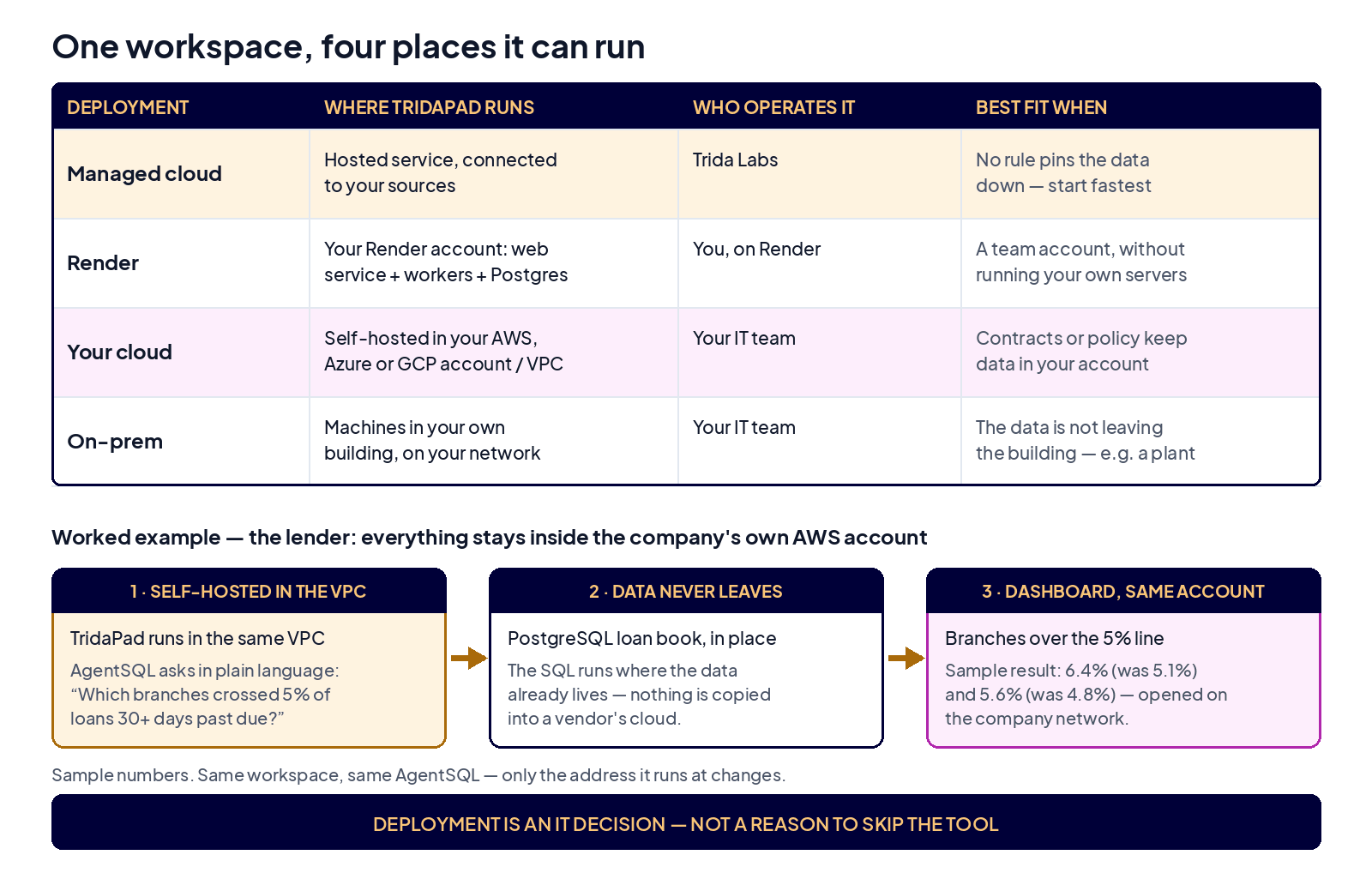
Managed cloud. TridaPad runs as a hosted service and connects to your sources. Fastest to start; the right answer when no contract or policy pins the data down.
Render. TridaPad deploys onto Render from a published template — the deployment creates the web service, background workers for query execution, a managed PostgreSQL instance and a Redis key-value store, in your Render account.
Your cloud account. TridaPad runs self-hosted inside your own AWS, Azure or GCP account — in the same VPC as the warehouse it queries, under your IAM, your network rules and your region choice.
On-prem. TridaPad runs on machines in your own building, for the data that is not leaving the building. The plant floor case: production data stays on the plant network, and the workspace sits next to it.
The workspace does not change across the four. The same SQL editor, the same shared queries and dashboards, the same AgentSQL layer answering plain-language questions — what changes is the address it runs at and whose operations team keeps it running. That is the point: deployment becomes an IT decision, made once, instead of a reason the business team never gets the tool.
A worked example: the lender whose data stays in its VPC
Take a mid-size specialty lender — anonymized here, as our worked examples always are. Its loan book lives in PostgreSQL inside the company's own AWS VPC. Borrower data is covered by customer contracts and internal policy: analytics tooling may query it in place, but the data is not copied into a vendor's cloud. So TridaPad runs self-hosted in the same VPC, a network hop away from the database it queries, and AgentSQL works inside that deployment.
The collections lead's recurring question is the one below. The numbers in the result are sample numbers; the query is the real shape of the work.
"Which branches crossed 5% of their loans 30 or more days past due last quarter, and how did that rate move against the quarter before?"
-- Branches over the 5% line: share of loans 30+ DPD, by quarter
WITH quarterly AS (
  SELECT b.branch_name,
         DATE_TRUNC('quarter', l.snapshot_date) AS qtr,
         COUNT(*) FILTER (WHERE l.days_past_due >= 30) * 1.0
           / NULLIF(COUNT(*), 0) AS dpd30_share
  FROM loans l
  JOIN branches b ON b.branch_id = l.branch_id
  WHERE l.snapshot_date >= DATE_TRUNC('quarter', CURRENT_DATE)
                             - INTERVAL '6 months
  GROUP BY b.branch_name, DATE_TRUNC('quarter', l.snapshot_date)
)
SELECT branch_name,
       ROUND(100 * MAX(dpd30_share) FILTER
             (WHERE qtr = DATE_TRUNC('quarter', CURRENT_DATE)
                          - INTERVAL '3 months'), 1) AS last_qtr_pct,
       ROUND(100 * MAX(dpd30_share) FILTER
             (WHERE qtr = DATE_TRUNC('quarter', CURRENT_DATE)
                          - INTERVAL '6 months'), 1) AS prior_qtr_pct
FROM quarterly
GROUP BY branch_name
HAVING MAX(dpd30_share) FILTER
         (WHERE qtr = DATE_TRUNC('quarter', CURRENT_DATE)
                      - INTERVAL '3 months') > 0.05
ORDER BY last_qtr_pct DESC;
In the sample result, two branches come back over the line — one at 6.4%, up from 5.1% the quarter before, and one at 5.6%, up from 4.8%. The query, the result and the chart built from them all stay inside the company's account: the dashboard is a page in the self-hosted workspace, opened by the collections team on the company network, not a link to someone else's cloud. And because AgentSQL discovers the schema and verifies results before presenting them, the collections lead sees the SQL behind the percentages and can check what "30 or more days past due" was taken to mean — the definition is in the query, not in a vendor's black box.
Access still has to be governed, wherever it runs
Where the software runs is only half of the security conversation. The other half is who can ask what. Inside a TridaPad deployment, access is per user: role-based access decides which sources and dashboards a person can see, and the built-in MCP server — for teams connecting an AI client such as Claude to the same workspace — authenticates per user with an API key, so the AI client works under the same permissions as the person holding the key. A self-hosted deployment does not loosen any of that; it places the same controls inside a network boundary the company already trusts, which is usually why IT asked for it in the first place.
What deployment choice does not solve
Honest limits. First, self-hosting means your team operates the thing: upgrades, backups and uptime become your operations work, or a managed arrangement has to cover them — the Render and managed routes exist precisely for teams that do not want that job. Second, putting the workspace next to the data does not fix the data: if two source systems disagree about a customer, the dashboard in your VPC will faithfully show the disagreement. Third, a deployment inside your network still needs the ordinary discipline — patched machines, keys rotated, access reviewed. Location is a control, not a substitute for the others.
Start where your data already is
Most analytics evaluations die on a question that has nothing to do with analytics. They do not have to. Decide whose account the workspace runs in, put it next to the data it queries, and let the team get on with asking questions. Try TridaPad in the deployment your policies actually allow — or write to us at data@tridalabs.com and tell us the rule your data has to live under, and we will start from there.